Using libfec for FEC Filing Days, April 2026 Edition
April 15th, 2026 by Alex Garcia
Pro-tip: Join the libfec email list to get notified on new releases and blog posts!
It's April 15th of an election year, so you know what that means: it's an FEC filing day!
Today every congressional campaign for House or Senate is required to submit their F3 financial reports to the FEC, detailing their financial activity from the first three months of 2026. This includes how much money they've raised, who's given them money, what they've spent on, and how much debt they have.
Filing days are marked by dozens of news articles detailing who's given to candidates, which candidates have raised more than their opponents, and speculation on who's most likely to win their seats.
And to do this, I recommend libfec, my CLI tool for downloading FEC data! If you're unfamiliar, I recommend my initial libfec annoucement blog post (October 2025), or watch this libfec Introduction video on Youtube (March 2026) to learn more about what libfec can do.
So for those journalists or researchers who are knee-deep in FEC financial forms today, here's are few libfec tips that might save you time!
¶ Get a FEC API key and use the LIBFEC_API_KEY environment variable
The libfec CLI makes extensive use of the FEC API for sourcing filings. While the default DEMO_KEY is fine for a few quick demos, you'll hit a limit after just 10 requests, so getting your own key is essential! That link has a form to do just that, and it's free!
Once you have your key, I recommend setting the LIBFEC_API_KEY environment variable to give libfec access, like so:
export LIBFEC_API_KEY='__your_key_here__'

# now future libfec calls will use that key when resolving filings!
libfec export C00905307 -o biss.db
If you use 1Password to store credentials, this is the 1-line command I run to get my FEC API key from my vault into my bash environment, using the official 1Password CLI:
export LIBFEC_API_KEY="$(op item get "My FEC API Key" --fields label=credential --reveal)"
¶ Getting All F3's for your home state
Congressional campaign file F3 reports on quarterly deadlines to disclosure their financial actity. To get your state's congressional campaign filings with one command, you could run:
 libfec export \
  --election 2026 \
  --state CA \
  --office H \
  --form-type F3 \
  --report-type Q1 \
  --report-year 2026 \
  -o ca-f3-q1.db
Here we are getting all the F3 reports filed by congressional candidates running in California for a House seat, for today's FEC filing deadline. This command uses the /v1/efile/filings endpoint under-the-hood, meaning it gets the latest submitted filings, even if they don't appear on the FEC website yet.
Once it's in the SQLite database, you can use SQL for analytical queries, or export the libfec_f3 table into a CSV. But this can be tedious! If you want a better view, use the libfec datasette command like so:
libfec datasette ca-f3-q1.dbThis will start an instance of Datasette on your database, with datasette-libfec installed. This requires uv to be installed.
Once opened, you can navigate to the "Filing Day" tab at the top, where you'll have this UI to view all filings for a specific reporting period:
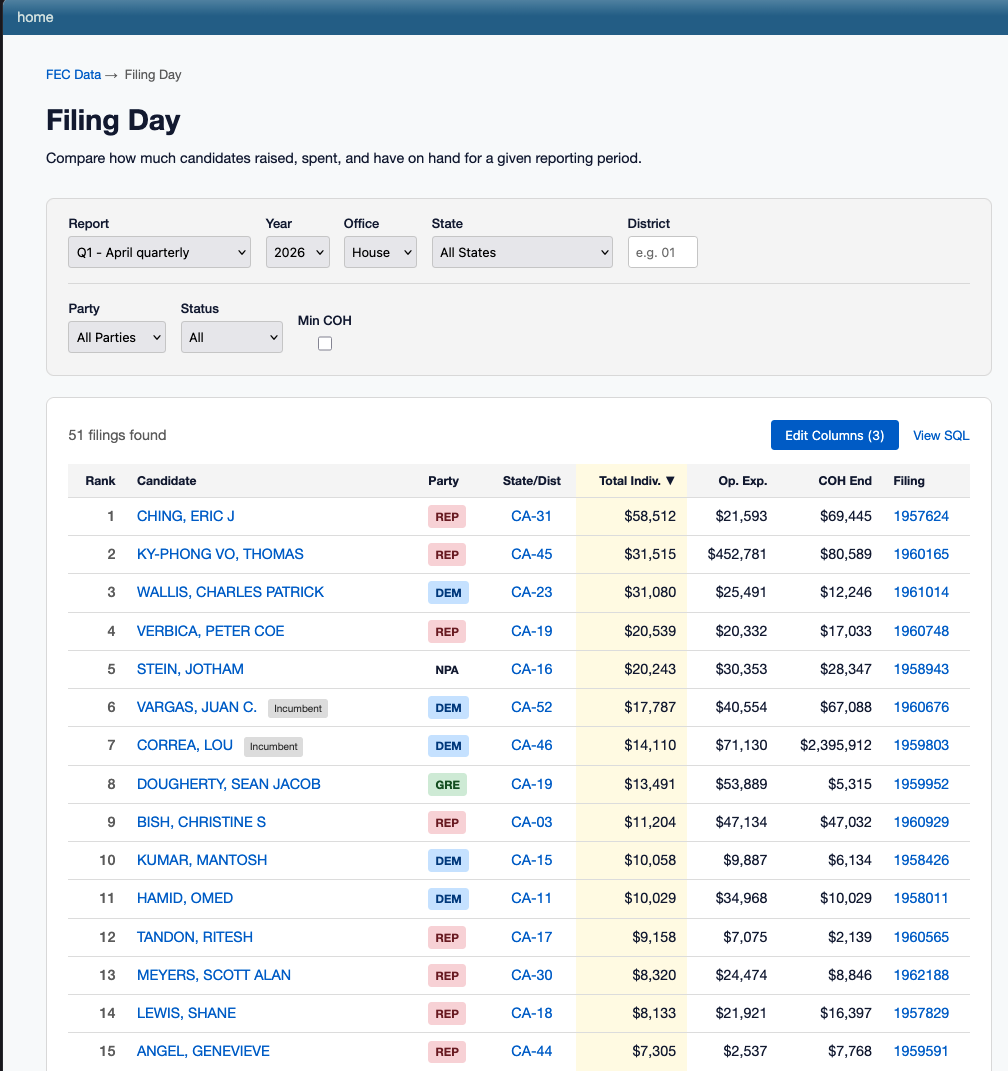
Here we can compare all F3s submitted by California House campaign for this reporting period, sorted based on money raised, spend, cash on hand, etc. This will only show filings from your initial export, so don't draw conclusions until all candidates have filed!
You can also click through to a specific filing to view a better breakdown of how a candiate raised/spent money:
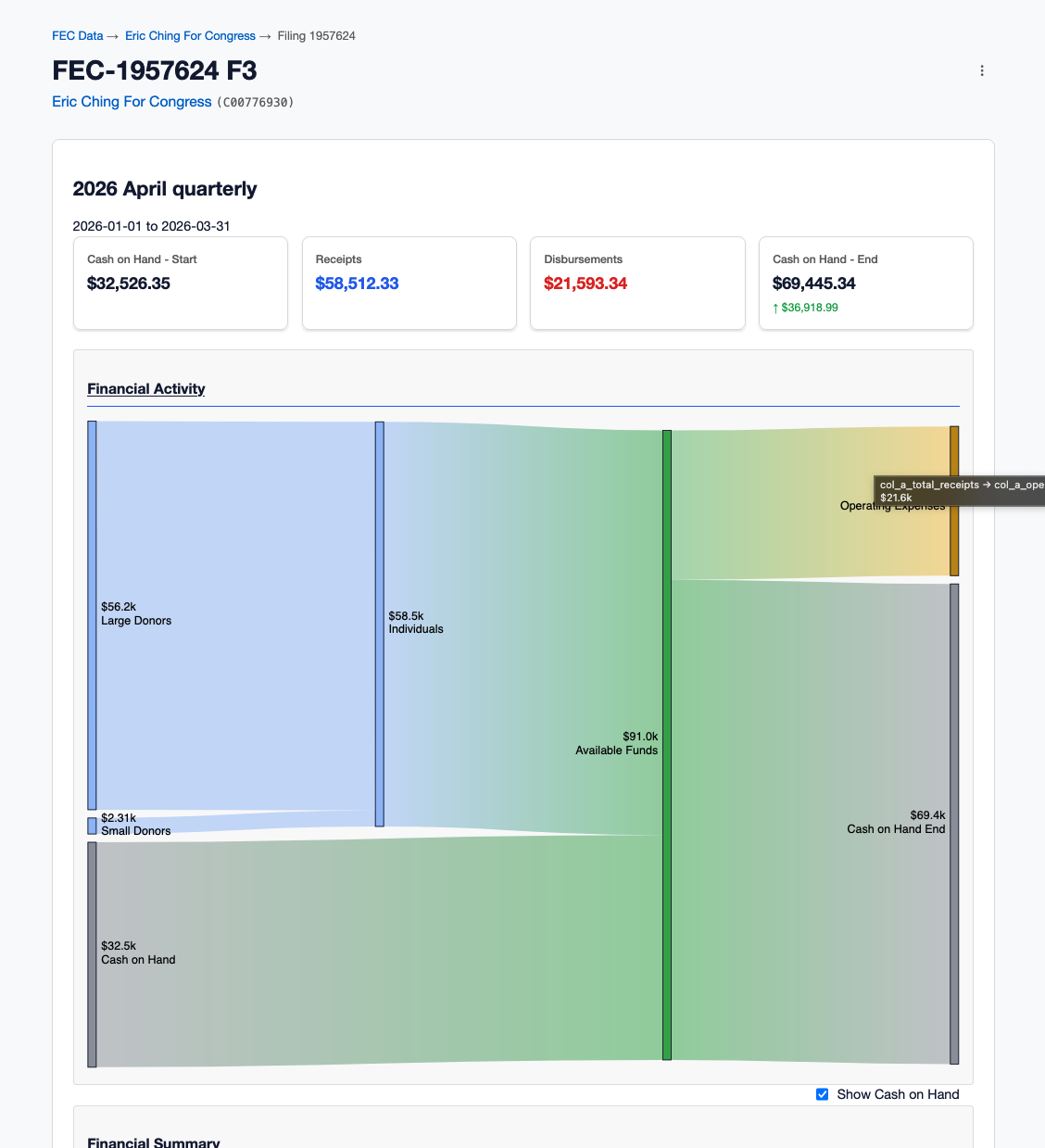
¶ Get "live" filings with the libfec rss subcommand
The libfec export performs a one-time export of filings up until that point. If you want to continously watch for new filings, then try libfec rss!
The FEC publishes an official RSS feed of live filings submitted by campaigns and committees. The libfec rss subcommand can query this feed for you like so:
libfec rss
FEC Electronic Filing RSS Feed - ALL
Data freshness: 50 seconds ago
URL: https://efilingapps.fec.gov/rss/generate?preDefinedFilingType=ALL

╭───────────────────────────────────────────────────────┬──────┬─────────────────┬───────────┬────────────────╮
│ Committee                                             │ Form │ Report          │ Filing ID │ Age            │
├───────────────────────────────────────────────────────┼──────┼─────────────────┼───────────┼────────────────┤
│ COASTAL FEDERAL CREDIT UNION PAC                      │ F3XN │ APRIL QUARTERLY │ 1964241   │ 1 minute ago   │
│ DMP VICTORY FUND                                      │ F3XN │ APRIL QUARTERLY │ 1964242   │ 1 minute ago   │
│ FOR MICHIGAN ACTION FUND                              │ F3XN │ APRIL QUARTERLY │ 1964243   │ 1 minute ago   │
│ GALLREIN VICTORY FUND                                 │ F3XN │ APRIL QUARTERLY │ 1964244   │ 1 minute ago   │
│ JUDY CHU FOR CONGRESS                                 │ F3N  │ APRIL QUARTERLY │ 1964245   │ 1 minute ago   │
│ BERA VICTORY FUND                                     │ F3XN │ APRIL QUARTERLY │ 1964236   │ 2 minutes ago  │
│ NATIONAL SECURITY INNOVATION BASE PAC (NSIB PAC)      │ F3XN │ APRIL QUARTERLY │ 1964237   │ 2 minutes ago  │
│ EXACT SCIENCES CORPORATION POLITICAL ACTION COMMITTEE │ F3XN │ APRIL QUARTERLY │ 1964238   │ 2 minutes ago  │
│ FIRST DISTRICT REPUBLICAN COMMITTEE                   │ F3XN │ APRIL QUARTERLY │ 1964239   │ 2 minutes ago  │
│ TEHAMA COUNTY REPUBLICAN CENTRAL COMMITTEE (FEDERAL)  │ F3XN │ APRIL QUARTERLY │ 1964240   │ 2 minutes ago  │
│ MARK KELLY FOR SENATE                                 │ F3N  │ APRIL QUARTERLY │ 1964176   │ 12 minutes ago │
│ FREEDOM FOR ALL AMERICANS                             │ F3XN │ APRIL QUARTERLY │ 1964229   │ 3 minutes ago  │
│ KEVIN LINCOLN FOR CONGRESS                            │ F3N  │ APRIL QUARTERLY │ 1964230   │ 3 minutes ago  │
│ GROW THE MAJORITY                                     │ F3XN │ APRIL QUARTERLY │ 1964231   │ 3 minutes ago  │
│ ENVIRONMENT AMERICA ACTION FUND                       │ F3XN │ APRIL QUARTERLY │ 1964232   │ 3 minutes ago  │
│ DEMOCRATIC CLUB OF THE CONEJO VALLEY - FEDERAL        │ F3XN │ APRIL QUARTERLY │ 1964233   │ 3 minutes ago  │
│ TEAM BUDDY                                            │ F3XN │ APRIL QUARTERLY │ 1964234   │ 3 minutes ago  │
│ NOAH BLOM FOR CONGRESS                                │ F3N  │ APRIL QUARTERLY │ 1964235   │ 3 minutes ago  │
│ SERVICE AND HONOR                                     │ F3XN │ APRIL QUARTERLY │ 1964214   │ 6 minutes ago  │
│ JENNY FOR CONGRESS                                    │ F3N  │ APRIL QUARTERLY │ 1964223   │ 4 minutes ago  │
╰───────────────────────────────────────────────────────┴──────┴─────────────────┴───────────┴────────────────╯

Showing 20 of 5507 items
The --watch flag can be used to spawn a TUI that refreshes every 5 minutes (or a different custom internal with --interval).
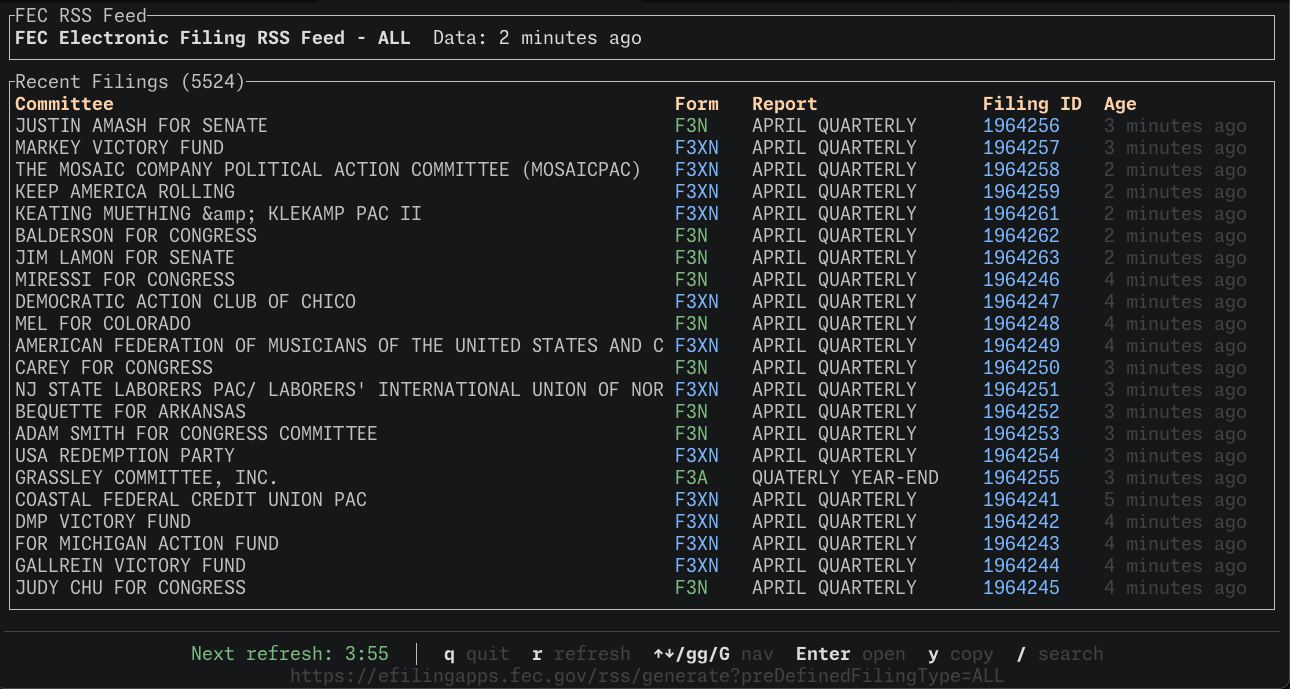
But what's more interesting is the --export command, which automatically loads new filings from the RSS feed to the SQLite database of your choice, like so:
libfec rss --watch --export filing-day.db --since '1 day ago'The RSS feed typically holds the last 7 days worth of data, so you can use the --since flag to filter it down a bit.
The rss command can also filter based on form type, committeee, or state. Here we're getting just the F3 reports from CA campaigns:
libfec rss --watch --form-type F3 --state CA --export ca-filing-day.dbSee libfec rss --help for more filter flags.
This command is quite powerful! Use this with the libfec datasette command to have a live view of filings, without the need to setting up a complicated custom pipeline.
¶ Experimental Alerts on FEC Filings
I've been working on adding "alerts" to Datasette with the experimental datasette-alerts plugin. The idea is that you can "subscribe" to new rows or events on a SQLite table, and datasette-alerts can send Slack, Discord, ntfy.sh, or even desktop notifications to you.
This is still very experimental, but if you want a quick demo of this can look like, here's a quick recipe: In one terminal, run the rss command to continously export new filings to a SQLite database:
libfec rss --watch --interval 30 --export filings.dbThen in another tab, run this monstrous uvx command:
uvx \
  --prerelease=allow --no-cache \
  --with 'datasette-libfec==0.0.1a21' \
  --with 'datasette-alerts' \
  --with 'datasette-alerts-slack' \
  --with 'datasette-alerts-ntfy' \
  --with 'datasette-alerts-desktop' \
  datasette \
    -s permissions.datasette_libfec_access true \
    -s permissions.datasette_libfec_write true \
    -s permissions.datasette-alerts-access true \
    -s permissions.datasette-cron-access true \
    filings.db \
    --internal internal.db
This will start Datasette with datasette-libfec and datasette-alerts enabled. You'll need to set up an "alert destination", like a Slack webhook or a desktop notification in alerts plugin here http://127.0.0.1:8000/-/filings/datasette-alerts/destinations.
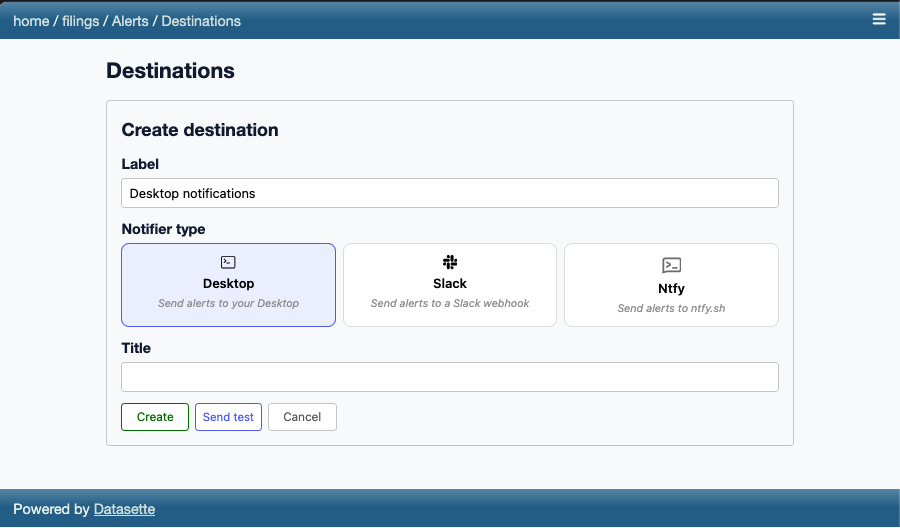
Here I'm doing a desktop notification with datasette-alerts-desktop since it's all local, but you can also configure a Slack notification with datasette-alerts-slack.
Once that's setup, you can setup a FEC-related alert on the libfec alert page at http://127.0.0.1:8000/filings/-/libfec/alerts:
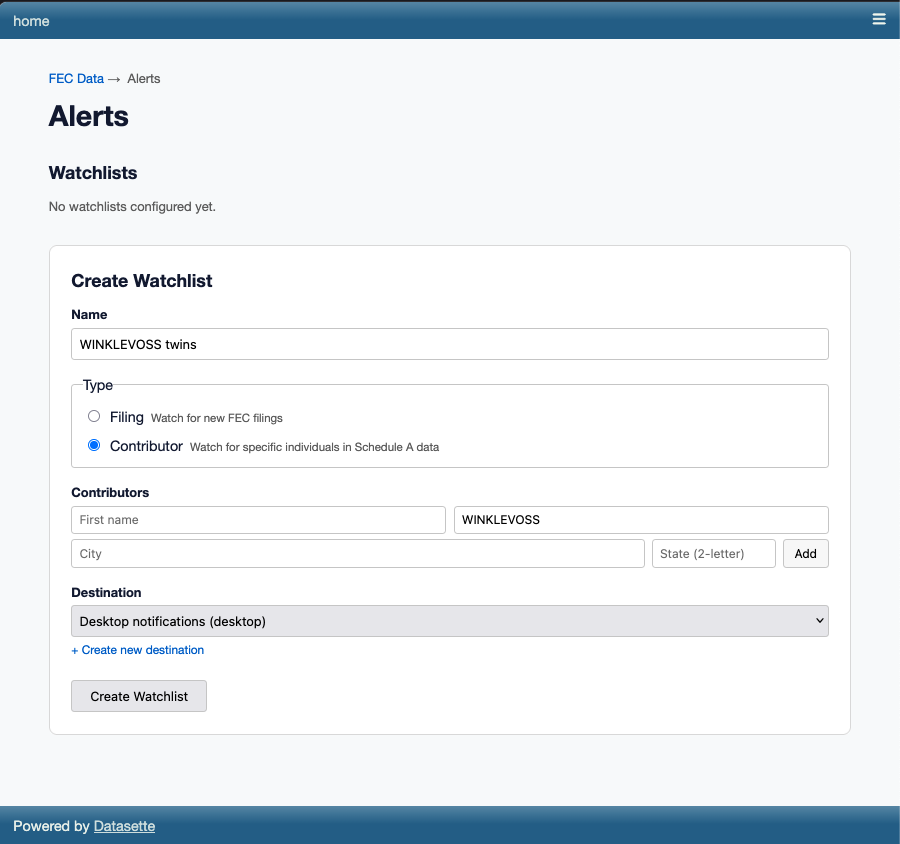
Currently you can setup an alert when a specific committee submits a filing, or when an individual contributes to a committee. Since FEC Notify already does committee-based alerts, let's try to individual alerts!
Here I want to watch contributions made by the Winklevvoss twins, who are super-invested in crypto candidates. I'm matching on the last name only since "winklevoss" is pretty unique, which may give false positives.
Once I saved this alert, I started to get notifications pretty quickly!
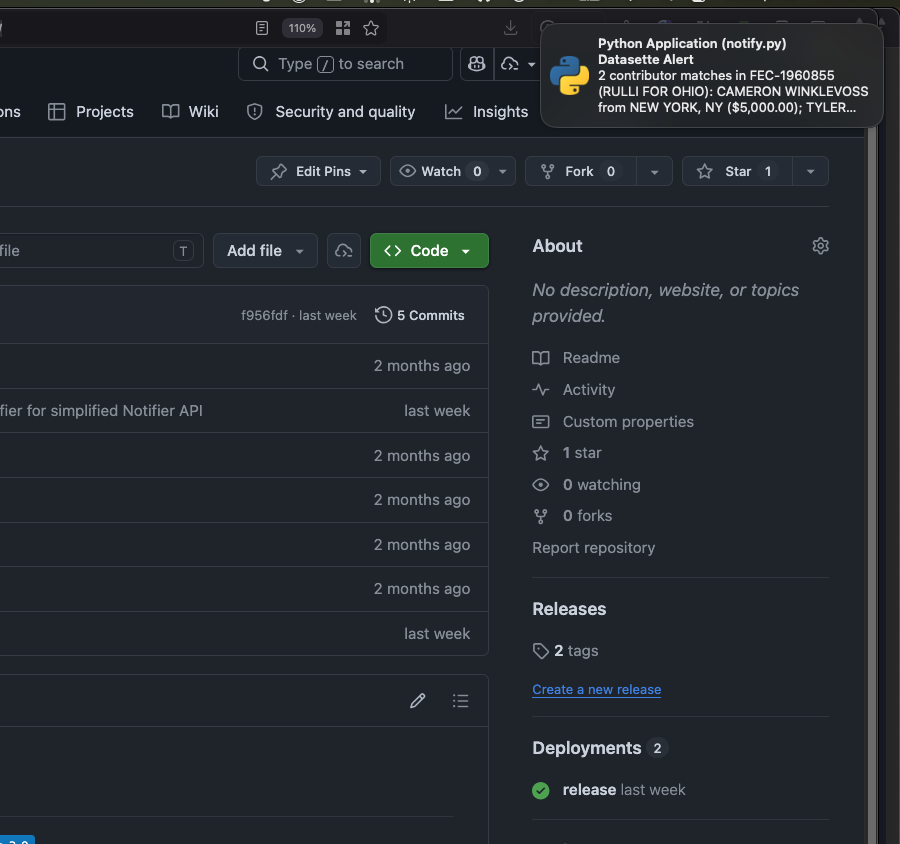
Here's a sample of their donations: https://docquery.fec.gov/cgi-bin/forms/C00436386/1959026/sa/12
¶ libfec is still a work-in-progress, but give it a shot!
If you run into any bugs or have any questions, feel free to join our email list, post in our Discussions forum, or email me directly!