Weeknotes: September 28th to October 4th, 2026
October 7th, 2026 by Alex Garcia
Note: The words here are written by me, not AI!
Inspired by Simon Willison's old "weeknotes" series, I want to give it a shot myself! So here are some general notes of projects and tools I worked on last week.
¶ Improving libfec, a federal campaign finance tool
libfec is a project of mine that parses .fec files, the Federal Election Commission's custom file format for FEC filings. These are data files that federal campaigns and committees submit to the FEC to report their financial activity leading up to US elections (think congressional, Senate, and presidential campaigns, super PACs, corporate PACs, etc.).
I first released libfec last October and taught a libfec session at NICAR26 in March.
libfec is most commonly used as a CLI, but the libfec parser itself is a low-level Rust library.
¶ Python bindings for libfec?
The libfec parser is flexible enough to be pulled out and used in other places, like Python! This week I took a stab at a new Python library for libfec using PyO3, which is coming soon in #20 and #63.
The ideal API will eventually look like:
import libfec_parser as fec
from libfec_parser.covers import Form3X

with fec.open("1926068.fec") as filing:
    match filing.cover_data:
        case Form3X() as f3x:
            f3x.report_code_label()                       # 'November Monthly'
            f3x.summary.line6c_total_receipts.column_a    # 445072.35
            f3x.coverage_from_date                        # datetime.date(2025, 10, 1)
        case None:
            ...
¶ fec-viewer, an experimental desktop app for viewing .fec files
I've known for a while that the Zed text editor was written completely in Rust, including its custom GPU-powered UI. But trying it a year ago was difficult and confusing.
But last week I listened to this Syntax podcast episode about GPUI, the Rust library behind Zed's editor. Having a way to build a simple desktop app for Windows/macOS/Linux in pure Rust, without using Electron/Tauri, sounds like a dream!
And since the libfec parser is written in Rust, I was able to make fec-viewer, a lightweight desktop app for viewing .fec files. Here's a screenshot:
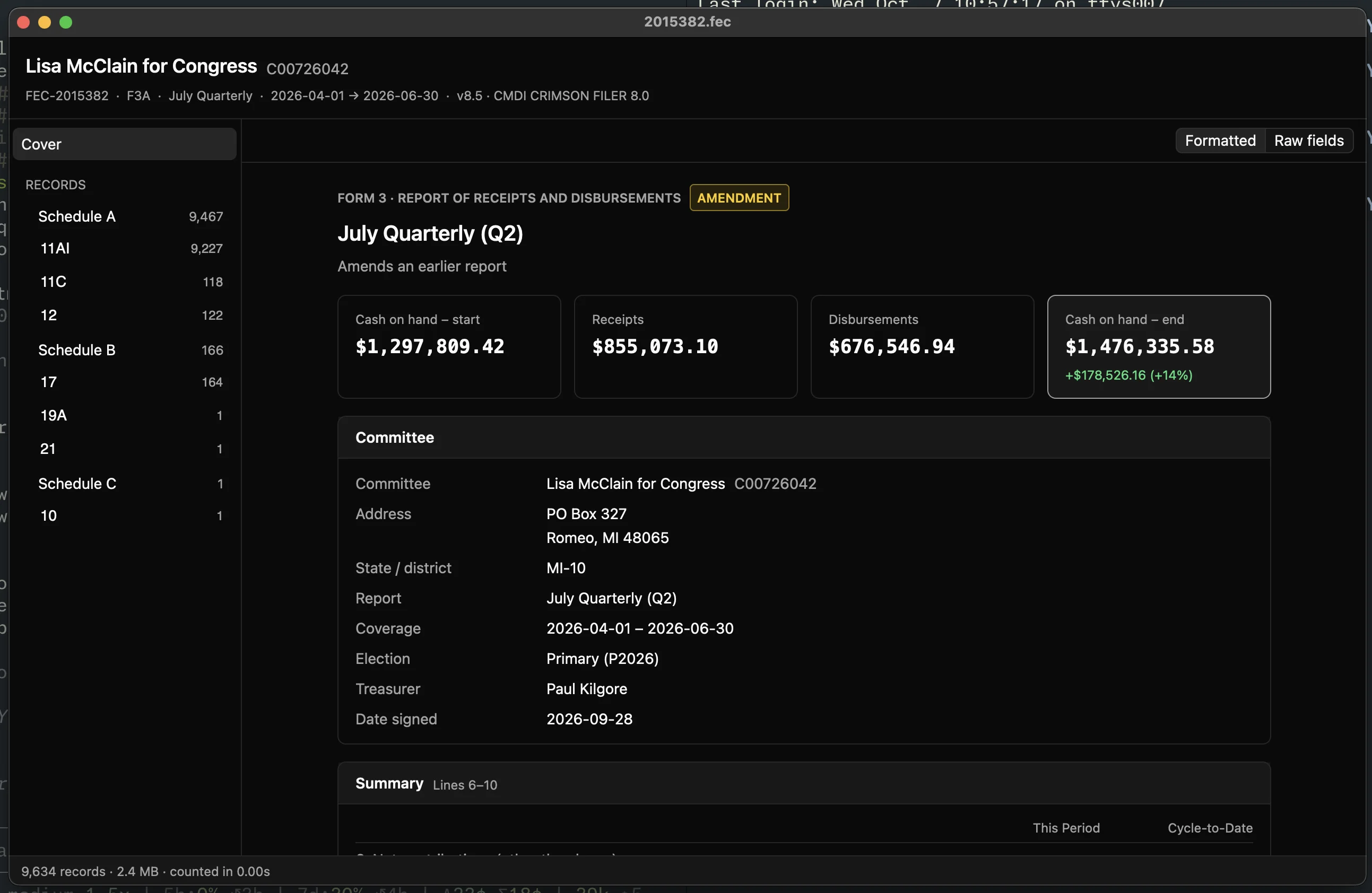
The UI is too Claude for my taste, but expect improvements in the future!
The idea is simple: .fec files are just files on your computer, so when I click on a .fec file in Finder, I want a quick UI of the contents of it (which committee submitted the filing, how much money they reported raising or spending, etc.). And fec-viewer does exactly that, in just a 16MB .dmg! And since it's in Rust, we can efficently preview and explore the largest FEC filings out there, even 10GB ActBlue filings!
I'm able to build it locally and publish binaries to GitHub releases, but there are some hoops to jump through to try it natively yourself.
So instead, try the fec-viewer WASM demo directly in your browser! GPUI can compile to WASM and run in your browser, so that demo allows you to drag/drop .fec files onto a webpage and use the viewer, or pick a sample one.
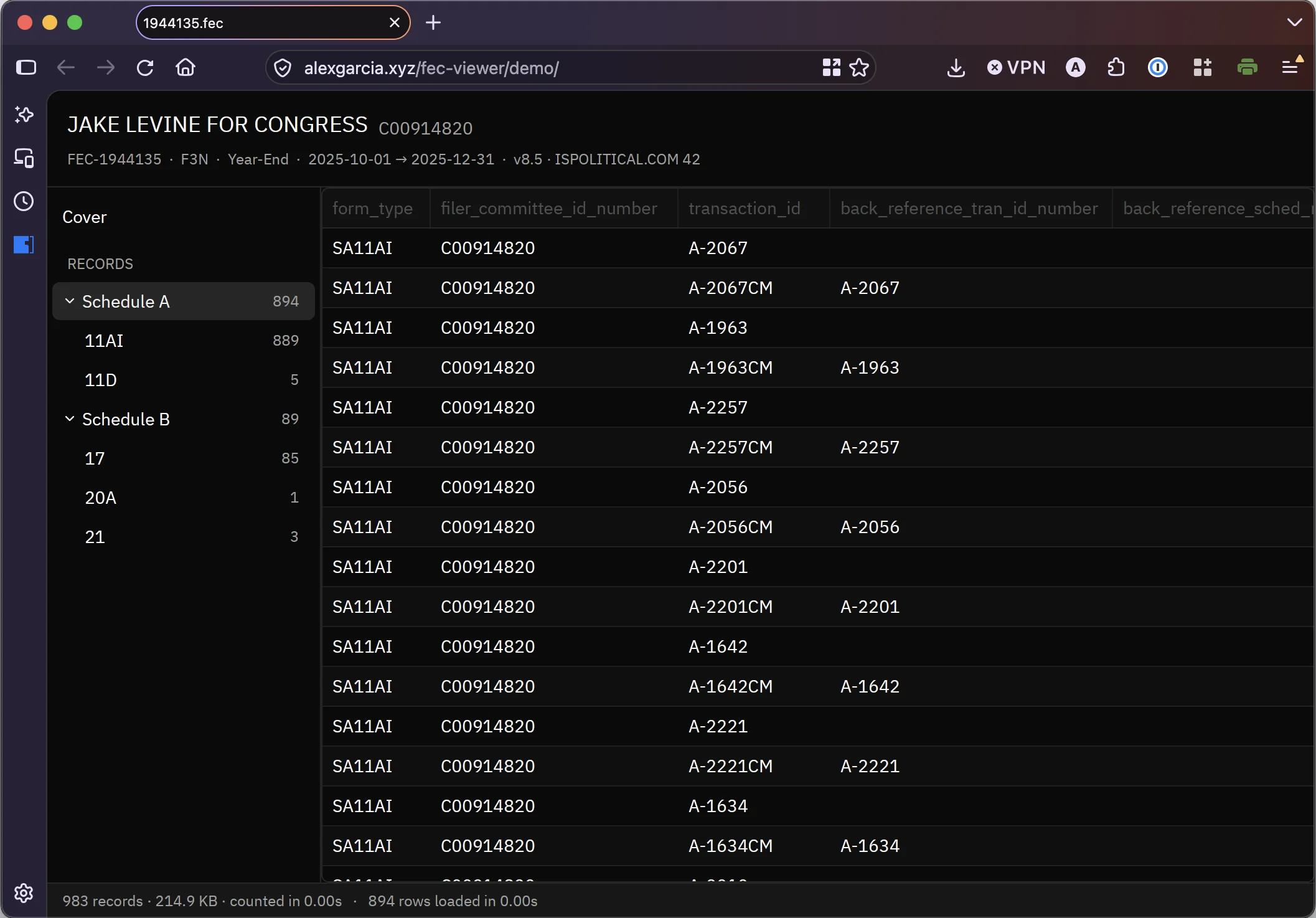
Now ideally, fec-viewer should have one user: me! The goal behind libfec is to handle all the complicated .fec parsing and FEC lingo for you, so you ideally only have to work with the data in CSV, JSON, or other friendly formats. You should never even need to know that .fec files exist, let alone need a desktop app to view them. But for people like me who are building tools on top of .fec files, this desktop app is pretty helpful!
The UI isn't great: lots of boring key/value pairs, no way to convert the tabular itemization data into CSV/JSON. But I plan on fixing that in the coming weeks!
¶ fec-receipt-printer, printing physical receipts of FEC filings on-demand
I want to have more demos of libfec working with realtime FEC data. In the weeks leading up to elections, some committee and campaign activity must be reported within 24-48 hours of a transaction happening (large donations to a campaign, large expenditures of a super PAC, etc.).
In comes a thermal receipt printer I bought off Amazon five years ago. It's been mostly collecting dust, but it's very easy to write some code to print whatever you like, especially with agents.
So out came fec-receipt-printer, a program that prints information about an FEC filing to a physical receipt.
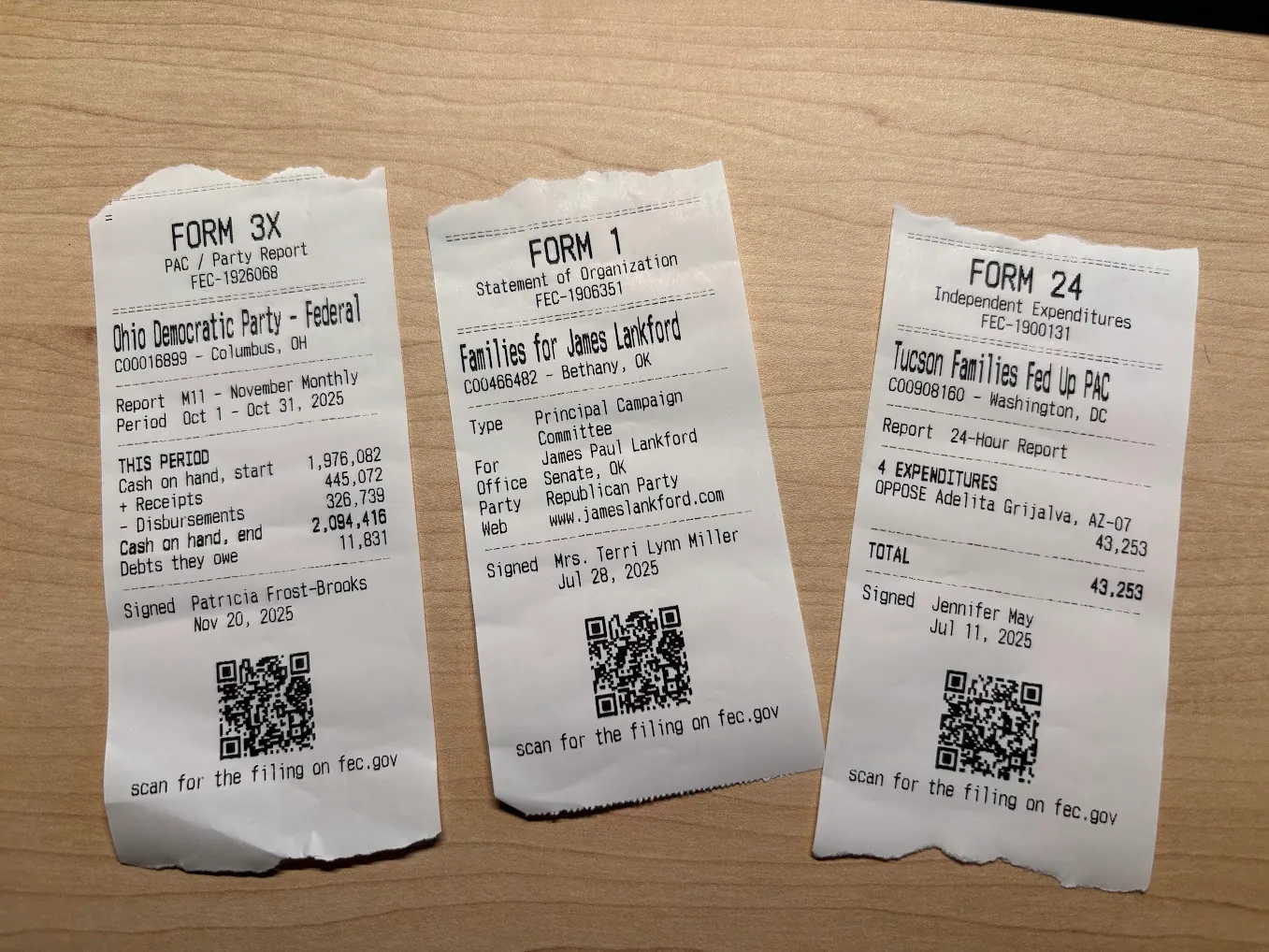
To try it yourself, you can use the fec-receipt-printer WASM demo in your browser. It's currently a Rust project (probably will change in the future), so the text rendering logic works in WASM. If you have a compatible receipt printer, then the demo in Chrome can even connect to your printer with WebUSB and print it for you!
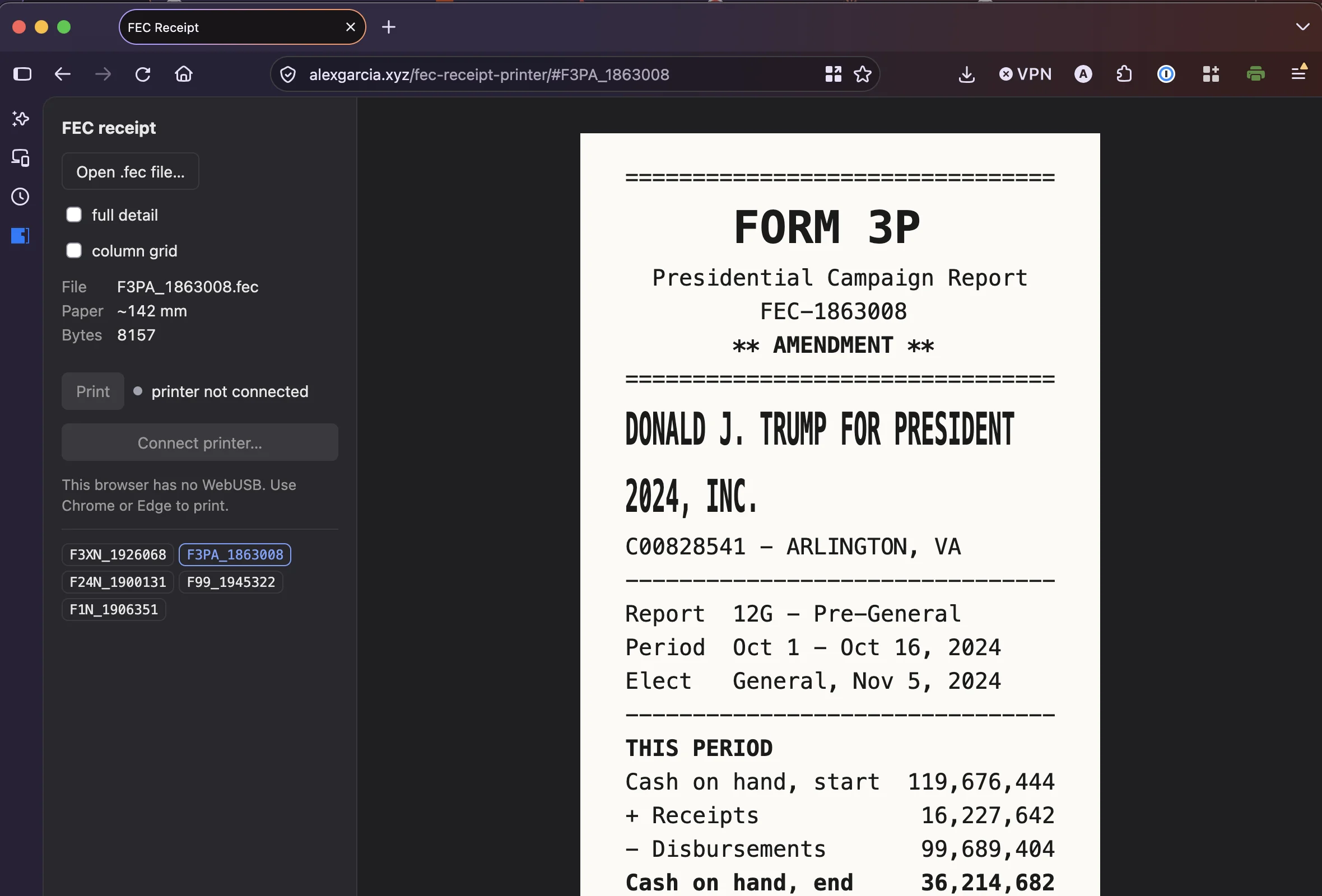
Again, expect some more updates on this in the coming weeks!
¶ OpenTelemetry in Datasette
Over the past few weeks we've been working on adding OpenTelemetry to Datasette. OTel allows for easier monitoring and observability into a Datasette application, to help answer questions like "which SQL queries are the slowest when rendering this page?" or "how long does it take to service this request?". See the Datasette OpenTelemetry docs for more information.
The OTel ecosystem is giant and intimidating. Thankfully, it's also completely optional: Datasette core only relies on opentelemetry-api, a tiny Python library that just adds custom traces/spans to the Datasette codebase. By default the overhead of these is minimal, but you can opt in to capture this data with a variety of open source OTel Python libraries/tools.
Instead of wiring up these generic OTel tools yourself, we have a suite of Datasette-specific plugins you can try.
First, datasette-otel-otlp-exporter, a plugin that exports OTel traces to an endpoint of your choice, using the standard OTLP protobuf format. Most OTel tools accept this, like Jaeger or Honeycomb/Grafana Cloud.
There's also the similar datasette-otel-prometheus plugin, which serves OTel metrics on a dedicated Prometheus-compatible endpoint. Very helpful on fly.io.
Then there's datasette-otel-file-exporter. The above two plugins usually require dedicated services that can get expensive, so this plugin just exports OTel spans to gzipped JSON or Parquet files on disk or in S3. It's a lightweight and affordable alternative: just fire up DuckDB when you notice an issue and get all the data you need!
Finally there's datasette-otel-viewer, a custom frontend for OTel traces and spans within Datasette itself. Once configured, Datasette OTel data gets saved to a new SQLite database in your Datasette instance, and a custom frontend allows you to visualize and explore slow HTTP requests, SQL queries, and traces yourself. Not great for production, but great for local development and demos!
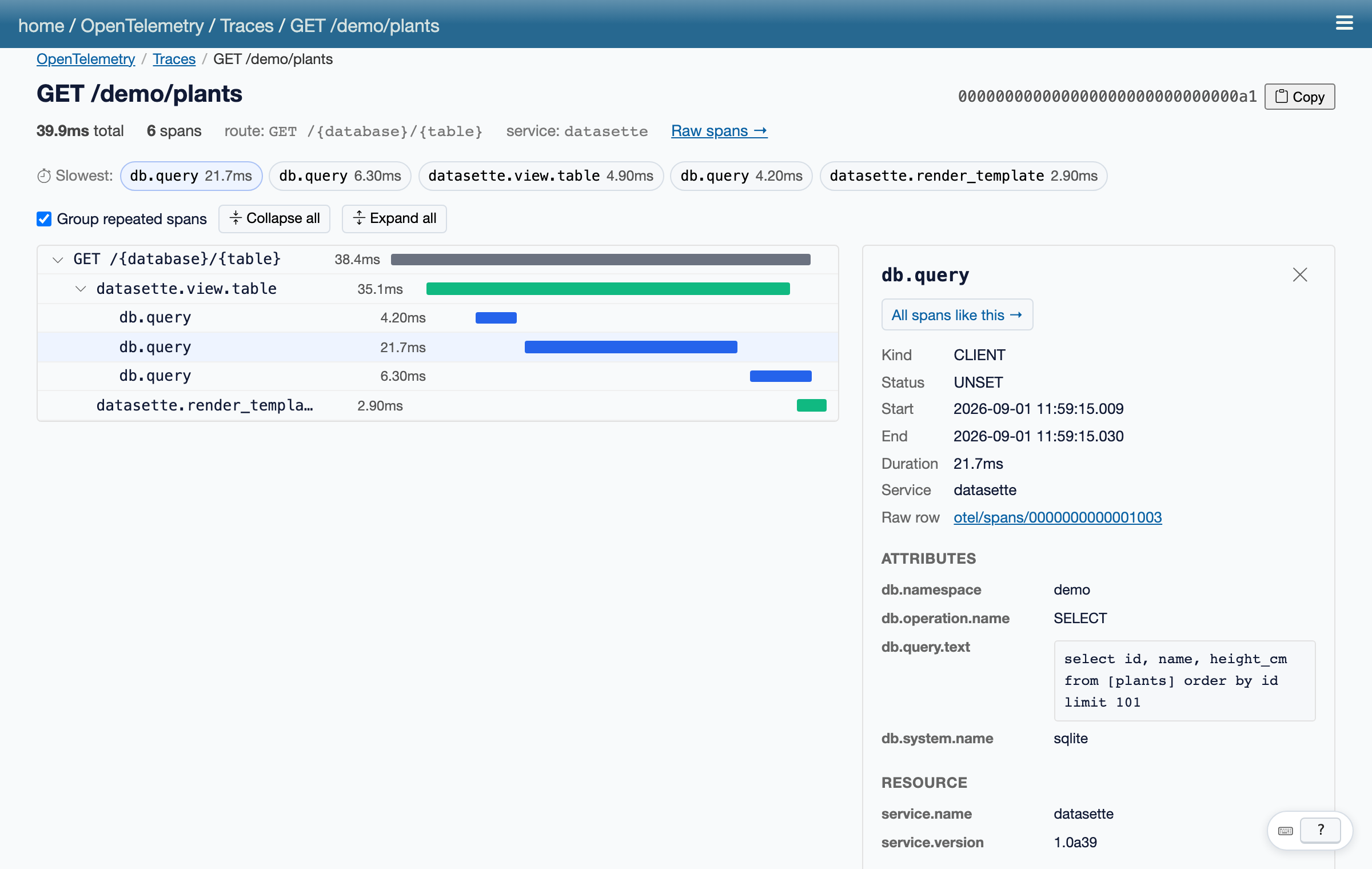
This week I worked on writing the official datasette.io blog post about the new OTel features, as well as adding custom OTel spans/metrics to Datasette plugins, like datasette-paper (#85), datasette-enrichments (#67), and datasette-apps (#41). This allows us to add plugin-specific telemetry, like "how long did each batch take in this enrichment job" or "how long did an agent spend calling tools in this session".
Keep an eye on the Datasette blog for a deep dive on the new Datasette OTel stuff!
¶ Google Sheets in Datasette?
I was working with some Google Sheets data again this week, and really wanted to get it into Datasette in the easiest way possible. I'm not a big fan of Google Sheets' half-baked CSV exports and locked down APIs, but navigating Google Cloud Console is even worse!
But it's also a great task for agents, so I came up with a few experimental Datasette plugins to explore this space.
The first is datasette-google-credentials, a Datasette plugin that specifically handles Google API credentials like OAuth or service accounts.
The idea is that as a Datasette administrator, you can let users of your instance attach their Google accounts to their Datasette actor accounts, with the normal "Sign in with Google" workflow. datasette-google-credentials handles that side of the house, encrypting secrets and storing them in the internal database, similar to datasette-secrets.
You can also use datasette-google-credentials for service accounts. Instead of attaching your entire Google account and exposing everything, you can instead configure a service account and share select documents or datasets with it. Then you can paste the service account JSON file into datasette-google-credentials, and use those credentials to only access files granted to that account.
But datasette-google-credentials doesn't touch your Google account data at all! Other plugins, like datasette-google-sheets, can use these stored credentials to access Google Sheets data, BigQuery, Google Calendar, etc.
For now, datasette-google-sheets has two main features: import data from a Google Sheet into a SQLite table in Datasette, or export data to a Google Sheet from a table/SQL query in Datasette.
This is quite a big project, and these two plugins are very experimental and may change drastically. If you're interested in giving feedback or learning more, come join the Datasette Discord!
¶ Pebble app for my morning coffee routine
I picked up a Pebble Time 2 last year, after desperately wanting a Pebble since they dropped on Kickstarter in 2012. I use it occasionally, usually just for time or the occasional timer/music changer.
But I thought of a good use-case that required a custom app: a very-customized coffee timer!
I make my morning cup of coffee with a V60. I've gone back and forth on my recipes, but I currently use 18-20g of coffee, with 185-195°F water and the following pour schedule:
0:00-> pour 60g, bloom0:45-> pour 30g, to 90g1:30-> pour 90g, to 180g2:15-> pour 60g, to 240g3:00-> pour 60g, to 300g
So I get around 30 seconds of downtime between pours, during which I usually try to do something small and quick around the house: rinse a mug, clean the coffee grinder, open a window. But I found myself getting distracted and missing my pour time by 15-20 seconds. The horror!
So I wanted a Pebble app that would vibrate alongside my pouring schedule, to give me a 5-second heads-up to go back to my coffee and do the next pour. Kinda like the Aeromatic app, but for my V60 instead of AeroPress, my watch instead of my phone, and quiet vibrations instead of alerts.
So I came up with pebble-v60-timer, a custom Pebble app to do exactly this.
And it works great! I can now perfectly master my four 30-second windows each and every morning. My kitchen has never been tidier.
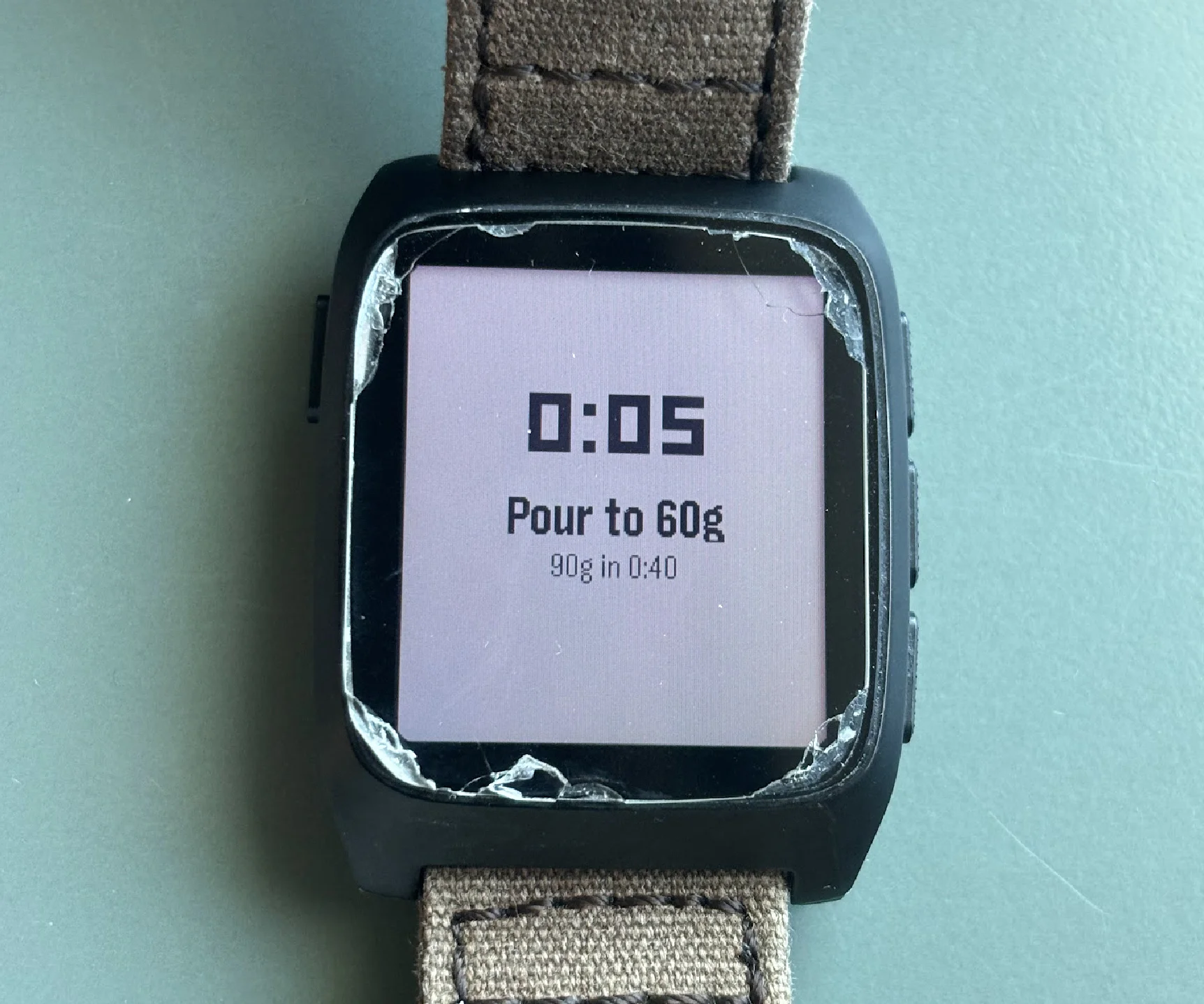
If I find the time to work on this more, I can see myself publishing this on the Pebble app store, or adding other features like customizable recipes/vibrations. But for now, feel free to slop-fork to your heart's content.
¶ The upcoming week
- More
libfecwork! Hoping to get a lot of the new fixes/features/website out before the Oct 15th and 20th filing deadlines - One or two datasette.io blog posts about Datasette OTel or
datasette-paper👀 - SQLite extension releases, like
sqlite-vec,sqlite-tg, andsqlite-jiff - Get my blog on standard.site!